
Bus Simulator Ultimate Skins and Liveries: Rules, Tricks, and Pro Design Ideas
If you play Bus Simulator Ultimate long enough, you eventually stop asking, “Which bus should I buy?” and start asking, “How can I make my entire fleet look like a real company?” This guide dives deep into Bus Simulator Ultimate Skins and Liveries — the rules, the clever tricks, and the pro design ideas that turn a random collection of buses into a branded fleet.
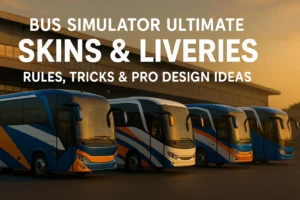
In this article we’ll keep things simple, visual and practical — perfect whether you’re on stock Android or running the latest Bus Simulator Ultimate MOD builds.
1. What Are Skins and Liveries in Bus Simulator Ultimate? 🚌
In the real world, a “livery” is the visual identity of a transport company — colors, logo, stripes and sometimes even slogans. Bus Simulator Ultimate Skins and Liveries work exactly the same way. They are custom textures wrapped around your buses that control how your vehicles look in menus, garages and on the road.
Zuuks Games gives players an easy way to apply and change liveries, but the community has taken this much further with custom templates, fan-made designs and full fleet branding packs. That’s why two players driving the same coach can feel completely different: one looks like a random rental bus, the other looks like a premium company with a serious brand.
- Skin: The actual image file or texture you import into the game.
- Livery: The full visual concept – logo, colors, placements and patterns across the bus.
- Fleet branding: When all your buses share the same visual language so they look like one company.
2. Why Consistent Fleet Branding Matters in Bus Simulator Ultimate
You might think skins are “just cosmetic”, but in a game like Bus Simulator Ultimate they’re a huge part of the fantasy. When your fleet has consistent liveries, your company suddenly feels real. Screenshots look better, multiplayer sessions feel more immersive and your profile instantly stands out in streams or TikTok clips.
What consistent branding gives you
- Recognition: Friends can spot your buses instantly in multiplayer.
- Immersion: Feels more like you’re running a real transport company, not a random garage.
- Content-ready visuals: Perfect for YouTube thumbnails, shorts and screenshots.
- Professional vibe: Clean and consistent liveries make even budget coaches look premium.
Random vs. branded fleet (at a glance)
| Aspect | Random Skins | Branded Fleet |
|---|---|---|
| Colors | Different on every bus | 2–3 shared brand colors |
| Logo & text | Inconsistent or missing | Same logo, same placement |
| Screenshots | Look chaotic | Look like a real company garage |
| Multiplayer presence | Easy to forget | Instantly recognizable |
3. Rules, Limitations and Things You Shouldn’t Do
Before we open Photoshop and go crazy with colors, it’s important to remember that Bus Simulator Ultimate Skins and Liveries still live inside an ecosystem: copyright law, game performance limits and community guidelines. Break those and you might run into trouble.
3.1 Copyright & trademark basics
- Avoid using real-world brands (airlines, bus companies, tech companies) unless you have permission.
- Do not copy another creator’s livery pack pixel by pixel – get inspired, but redraw in your own style.
- Skip offensive symbols or political content. It’s not worth getting reported in multiplayer.
3.2 Technical and performance rules
- Use reasonable resolutions. Ultra-4K textures on every bus may lag older Android phones.
- Keep file sizes optimized – compressed PNG or high-quality JPG usually works well.
- Test your skins in multiple lighting conditions (day, night, rain) to avoid weird color surprises.
4. Step-by-Step: Designing Bus Simulator Ultimate Skins and Liveries
Let’s walk through a simple workflow you can follow every time you design a new skin. You can use free tools like GIMP or Photopea, or paid tools like Photoshop — the logic is exactly the same.
Pick two main colors and one accent. For example: dark blue, white and orange. Use these on every bus so your Bus Simulator Ultimate Skins and Liveries always feel connected.
You don’t need a fancy logo. Even a clean text logo like “SkyLine Express” in a modern font will do the job.
Use a community template that shows how textures wrap on the bus model. Mark where the front, rear and sides are.
Add large color blocks or stripes that flow from front to back. Avoid tiny details; they’re hard to see in motion.
Add your company name near the front and center of the sides. Keep text big, readable and away from door edges.
Export as PNG/JPG, import into Bus Simulator Ultimate, drive a quick route and note what looks off. Adjust and re-export until the bus looks clean in every camera angle.
Recommended design tools ⚙
- GIMP: Open-source, great for layered PSD-style work.
- Photopea: Runs in your browser, perfect for quick edits on lower-end PCs.
- Photoshop / Affinity Photo: Best if you already use them for serious design work.
5. Pro Design Ideas for Eye-Catching Liveries
Once you understand the basics, it’s time to level up your creativity. Here are some pro-style concepts you can copy or adapt to your own fleet.
| Idea | How it looks | When to use it |
|---|---|---|
| Diagonal Speed Stripes | Bold lines starting near the front wheel and rising toward the rear. | Great for high-end coaches and long-distance routes. |
| City Skyline Silhouette | Dark skyline silhouette across the lower half of the bus. | Perfect if your company focuses on one major city hub. |
| Gradient Sunset | Smooth gradient from orange to deep purple at the rear section. | Looks amazing on screenshots, especially at golden hour. |
| Minimal White Fleet | Mostly white body with subtle colored accents and a clean logo. | For a modern, premium and realistic corporate vibe. |
6. Technical Insights: Resolution, Formats and In-Game Clarity
Good design can be ruined by bad export settings. Here are a few technical details worth keeping in mind when building Bus Simulator Ultimate Skins and Liveries for Android devices.
6.1 Suggested settings
- Resolution: 2048×2048 is a solid balance between sharpness and performance.
- Format: PNG for sharp logos and text, JPG for photo-heavy designs.
- Compression: Keep total file size as low as possible without visible artifacts.
- Testing: Always check your livery on both day and night routes.
6.2 Performance on low-end phones
If you or your friends use older Android phones, try building a “Lite” version of your favorite livery: slightly lower resolution, fewer gradients and no unnecessary glow effects. This ensures your fleet still looks clean even when the device is struggling with traffic and weather effects.
7. Bonus Gameplay Ideas: Turn Your Fleet into a Story 🌍
A strong visual identity isn’t only about looking pretty – it also feeds your imagination. Here are a few ways to use your Bus Simulator Ultimate Skins and Liveries as the foundation for better gameplay and content.
- Roleplay a company: Pick a name, a region and a slogan. Only open routes that make sense for your brand.
- Create series content: Use the same fleet liveries in a YouTube or TikTok series so viewers recognize you instantly.
- Seasonal editions: Keep a “core livery” then create limited winter or summer variants with small color changes.
- Multiplayer convoys: Ask friends to use your livery pack for cinematic convoys and screenshots.
8. Helpful Resources for Bus Simulator Ultimate Skins and Liveries
If you want to go deeper, these links are a good starting point. Always double-check that you’re downloading from safe, trusted sources.
- Official game page on Google Play for Bus Simulator Ultimate – latest updates from Zuuks Games.
- The developer’s official website Zuuks Games – news, trailers and other simulator titles.
- For MOD builds, maps and more tips, visit the main guide hub on GetBusimUltimateAPK.com .
9. FAQ: Bus Simulator Ultimate Skins and Liveries
1. Are Bus Simulator Ultimate Skins and Liveries free to use?
Many community skins are shared for free, while some creators release premium packs. Always read the creator’s license and never re-upload paid content as your own.
2. Do custom liveries affect FPS or performance?
Very large texture files can affect performance, especially on low-end phones, but most well-optimized skins have almost no impact on FPS. Keep file sizes reasonable and avoid stacking too many effects.
3. Can I share my own livery pack with friends?
Yes, as long as all assets are original or used with permission. Sharing unique designs is one of the best parts of the Bus Simulator Ultimate community.
4. How do I back up my favorite skins?
Keep a folder on your PC or cloud storage with the final PNG/JPG files and the PSD/XCF source files. That way you can quickly re-import them after reinstalling the game or switching devices.
5. What’s the easiest way to start if I’m not a designer?
Begin with a simple white bus, add two diagonal stripes in your chosen colors and place a clean text logo. Once you see it in game, you’ll get ideas for more complex Bus Simulator Ultimate Skins and Liveries.
10. Ready to Build Your Signature Fleet?
You now know the rules, the workflow and the tricks behind professional-looking Bus Simulator Ultimate Skins and Liveries. All that’s left is to open your editor, pick your colors and give your fleet a personality that other players will recognize instantly on the highway.
Want more visual guides like this? Explore our other Bus Simulator Ultimate tutorials and MOD articles on GetBusimUltimateAPK.com.